This section describes the basic concept for Information Sources. The information will be useful when configuring or developing Information Sources.
To learn more please consider the following topics:
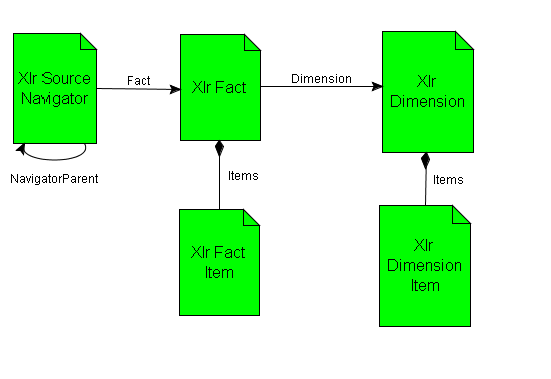
An Information Source is an IFS specific entity that expands the Start Schema model. The overview metadata model looks like this:
Figure 1: Information Source Data Model
The overview represents a Star Schema model, refer to Figure 2:Star Schema model. The model consists of a main transaction entity called Fact and associated basic data entities, so called Dimensions.
In IFS BI Services the entity Information Source means a Fact and one or more associated dimensions.
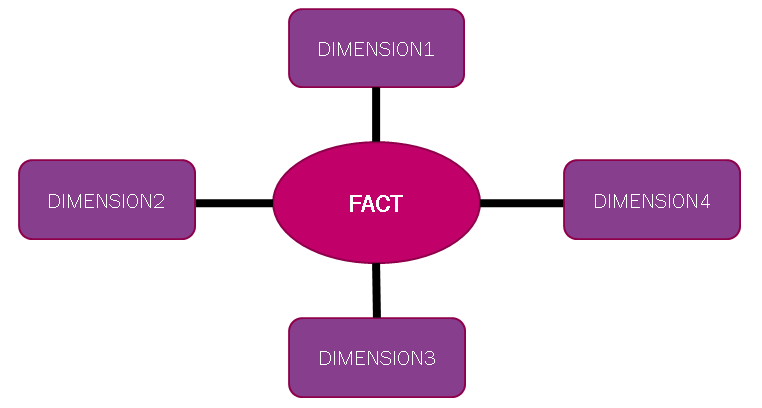
Figure 2: Star Schema model
The overview consists of the following technical entities:
| Entity Name | Description |
|---|---|
| XlrFact | Information about available Information Sources |
| XlrFactItem | Information about fact items, i.e. Information Source details |
| XlrDimension | Information about available dimensions (basic data) |
| XlrDimensionItem | Information about dimension items, i.e. basic data details |
| XlrSourceNavigator | Describes the structure of the so called BI Client Navigator
where each leaf node represents a link to a fact (Information Source). Through the BI Client Navigator the end-user gets access to data sources in the IFS Business Analytics client. |
The Fact in an Information Source has one or more items. We can distinguish the following type of items:
This is an item that represents measurable data, like amount, quantity etc.
This is an item that represents non-measurable data, i.e. extra information available in the information source that in some way adds information about a fact record like a text, note, verification number etc.
The following concepts are important to explain to avoid misinterpretation:
With Zoom In we mean displaying
the transactions in the Information Source associated with a measure value in
a cell. E.g. if a cell in IFS Business Analytics displays the sum of values
from GL Balances, then Zoom In will show the transactions in GL Balance that
are associated with this specific cell value.
With URL Navigation we
mean the possibility to navigate from Zoom In or Drill Down details to IFS Applications.
URL Navigation alternatives will be available after having performed Zoom In
or Drill Down if all necessary URL items, as specified for the Information Source,
are available.
With Write Back we mean the possibility to write back client information to IFS Applications. Two types, categories, of write back are supported:
- General Write Back
The main part of the Write Back logic is handled by IFS Business Intelligence Services. A PL/SQL API must be written that takes care of a standard attribute string and then performs necessary actions as validation, insert/update.
- Advanced Write Back
The main part of the processing logic has to be handled by a new PL/SQL API, that considers component specific needs as well as status/response back to IFS Business Intelligence Services.
The Write Back process can be boiled down to the following:
- Collect Data in the client
- Post collected data to the database
- Call an dedicated module specific PL/SQL interface that handles either general or advanced write back.