Data Migration is often used to set up interface jobs, where a file is loaded
from server into table in one job, and then a second job does the actual update
of IFS. Below is a description on how you connect two such jobs, ensuring that both
executes OK, and that error rows are taken care of.
Then these jobs may be started as background processes, for repetitive execution
f.ex.
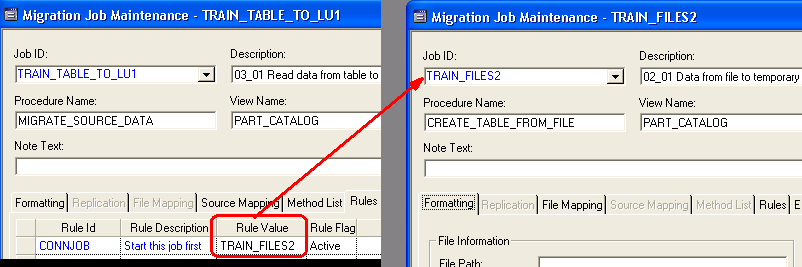
The File job is connected to the Migration job by activating rule CONNJOB on the Migration Job.
Now we only have to start the Migration job, and this will start the File job
first. As mentioned above, this is intended for interface jobs, reading files from
server.
Note: If there is a formatting error on the File job (date/number formats) both jobs stops and the error must be fixed.
But if errors occur on the Migration job, we can set up automatic handling of these errors :
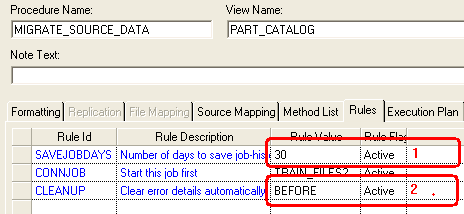
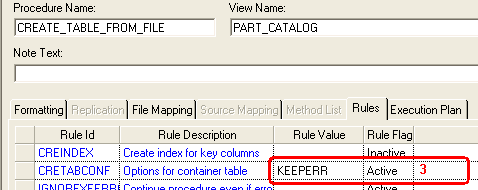
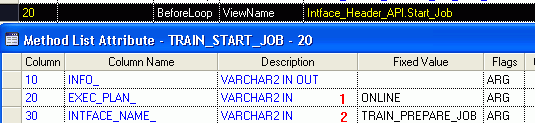
You may also start other jobs from the Method List, normally BeforeLoop or AfterLoop
, using Intface_Header_API.Start_Job in method Name.
The Method List Attributes look like this :
Note: The procedure Intface_Header_API.Start_Job will not raise any exception if specified job fails, and Data Migration will continue executing if you have more rows in your Method List.
Use procedure Intface_Header_API.Start_Job_From_Server if you want the whole execution to stop if started job fails.