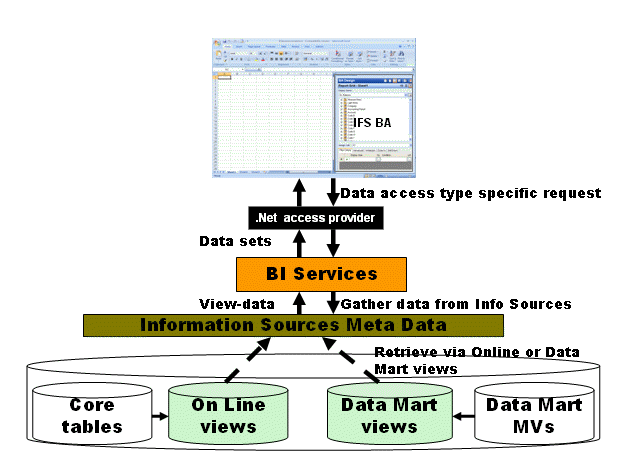
BI Services development means creating new Information Sources. An Information Source is a Star Schema consisting of one Fact, i.e. a transaction source, and one or more connected Dimensions. It is important to understand the basic characteristics of the Star Schema model to be able to develop Information Sources.
BI Services supports execution with respect to two access types; Online or Data Mart. Even if the Information Source model is the same for both cases there are some important differences when it comes to implementation.
BI Services acts as a service provider between IFS Applications and advanced clients like e.g. IFS Business Analytics.
IFS Business Analytics presents Information Source related data by retrieving Meta Data from BI Services. A report execution is made with respect to data access type, Online or Data Mart, and the data is gathered from referenced Information Sources.
An Information Source is a Star Schema consisting of one Fact and one or more Dimensions.
The Fact represents transactions, measurable data. The Dimensions normally represent basic data entities.
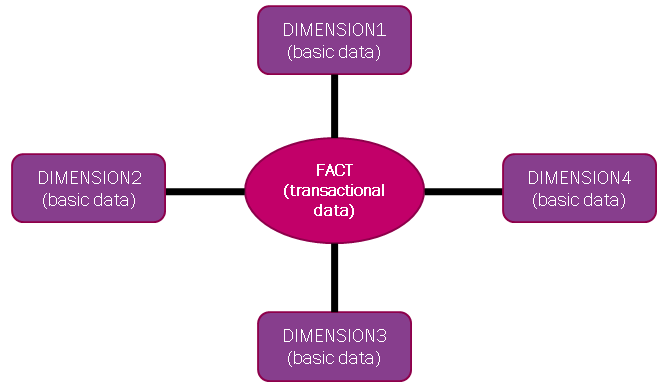
Facts and Dimensions are entities. The public data for such an entity is represented by a view, either a dimension view or a fact view.
In a Star Schema, the normal case is that one column in the Fact view is connected to one column in the Dimension view.
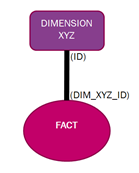
However to be able to support both Online and Data Mart execution, there must be other possibilities to define a connection between a Fact and a Dimension. The reason is mainly performance.
The general principle is:
The unique row identity column in a dimension, normally named
ID, is
connected to a column in the Fact named <dimension_name>_ID that keeps the
dimension row identity.
The big advantage with the Data Mart solution is that the data is stored in Materialized Views, meaning that all identities, even if derived, can be stored in single columns.
For Online execution it is normally not a good idea to use the default star schema join mechanism. The reason is the unique identity of a dimension row, in many cases, has to be derived from more than one physical column, leading to join of "virtual" non-indexed columns.
The solution is to define specific join information for each Fact-Dimension connection in the Meta Data that describes the Fact (Information Source centre). The join is in this case specified as a join between one or many columns for each connection, i.e. natural key joins.
Some Fact characteristics:
- Measure Items
Represents measurable data like amounts and quantities. Make sure that a Fact has at least one measurable item.
- Light Items
Represents non-measurable data, i.e. extra information available in the information source.
- Visible Light Items
Refers to all light items that are supposed to be visible or public.
- Key Column Items
Refers to all key columns in the original sources that defines the Fact.
It is recommended that these columns are represented by non-visible light items.
- Parent Key Items
Refers to items that represents the natural parent keys, e.g. company for Financial sources. In most cases defined as non-visible light items.
The items are necessary for List of values functionality and can also be opened up as visible performance items if necessary.
- Dimension ID Items
Each connection to a dimension is represented by one non-visible light item.
The item refers to a view column that has the unique identifier of one row in the corresponding dimension.
The items are used when building a join statement, for Data Mart access, that connects the fact with each referred dimension.
- Join Items - Joiners
For a Data Mart solution the Dimension ID Items are sufficient as join items between a fact and its dimensions.
However for an Online solution this is not good enough. For Online it is necessary to be able to refer to the natural join columns, more or less the key columns in the main source of each dimension. These columns must also be available as items in the fact and are normally defined as non-visible light items.
The join items can be opened up as visible performance items if necessary.
It is however not recommended to create a Dimension from a transaction source, since it might lead to performance problems during report execution or when performing List of Values.
Some Dimension characteristics:
The reason for having many items is to provide more possibilities. In a client like IFS Business Analytics the design and end-user experience benefits from having many possibilities when it comes to viewing/presenting data.
- Unique Identity
This item represents a unique row/record identifier and the suggested name is
ID. TheIDis created as a concatenation of the natural keys, e.g. parent keys and keys.The
IDshould not be visible.- Parent Items
Refers to items that represents the natural parent values, e.g. company for many of the Financial dimensions.
These items are defined as non-visible items.
It is important that the corresponding parent dimensions are available. E.g. the Account dimension has company as a natural parent item, leading to that there should be a Company dimension where the company identity is visible.
- Code Item
There should be one item that represents the natural end-user value in a Dimensions. This item is normally the natural key. The items is called the Code Item and the suggested name is
CODE. TheCODEis in the metadata also defined as theCodeKey.E.g. in the Dimension Account the code is the account code, in the Project dimensions the code is the project identity.
It can also be so that the code consists of more then one value. One example is the Accounting Period dimension, where the
CODEis defined as a concatenation of the accounting year and the accounting period. The reason is that there is no parent dimension representing Accounting Year, only the main parent Company is available.This is a visible item.
- Attribute Items
Refers to all other items in the dimension and they are normally visible.
- Standard
Most part of the dimensions a re created as Standard dimensions. This means that they can be used in a Star Schema, connected to a Fact.
- Supportive
A Supportive dimension looks nearly the same as a standard dimension, with the biggest difference that is cannot be connected to Fact in a Star Schema.
The main purpose is to serve as a List of values source, e.g. related to Info Service functionality.
- Inherited
An Inherited dimension can be used to create a copy of a dimension using a different Dimension Id with automated duplication of the all items belonging to the the source dimension.
- The information related to a Dimension might in IFS Applications be available in different components. Generally this is handled in the following way:
- Define unique dimensions in each component, typed as Standard dimensions.
- One Dimension can act as a so called Add-On Dimension, a dimension that provides information to another dimension.
When a Dimension is defined it can either get information from a Dimension, typically a static dependent parent Dimension, or it can put information to its parent Dimension.
- Normally only one of these Dimensions is connected to a Fact.
One example in the Dimension Account in Financials that will get information from dimensions representing Accounting Attributes and Accounting Structures. The Account dimension is connected to the facts, not the ones representing extra information (Accounting Attributes and Structures).
- An other way is to skip getting or putting information and instead make sure that the separate dimensions are connected to the target facts.
- When a Star schema is defined, the Fact refers to one or more Dimensions.
All the Dimensions might not be available at the time when the Fact is defined, since the referred Dimensions might belong to other components that are not yet available. This will lead to that an inactive reference is defined.
An invalid reference will be active/valid in all Information Sources when the Dimension is defined/installed.
Some general recommendations for Information Source development,
- Always develop dimension support for both Data Mart and Online data access types.
The reason is that dimensions are general entities that can be used by Information Sources in different product domains and it is not known when developing the dimensions if these Information Sources will support execution based on data access type Online or Data Mart.
- The Data Mart version of a dimension should consider NULL identities by generating special NULL identifiers.
- The Online version of a dimension should normally NOT consider NULL identities. If a dimension identity is available or not in the fact part of an Information Source, will in the Online case be handled by defining special join information based on the natural key items in the dimension and the joiners in the fact.
- Always find out the most common usage scenario and develop support according to this, i.e. Online and/or Data Mart support.
- If Data Mart support is developed is it extremely important to find out if the refresh of the Materialized Views representing the fact part are really refreshable with acceptable performance in the customer environment.
Also find out if it is necessary to refresh all transactions or if it is possible to introduce a refresh criteria to limit the number of transactions.
- Consider creating grouped Information Sources in the Data Mart case. One example can be to create a Materialized View that is based on grouped information from other Materialized Views.