Configuring output media types for Reports
For the purpose of sending a report to a customer or supplier using output
media types’ email or mail to fax, you need to create an event by selecting
Email as the Action Type.
- Open IFS Solution Manager.
- Select Configuration / Event Actions / New Event Action.
- Click Create New Event Action and open the Create New
Action window.
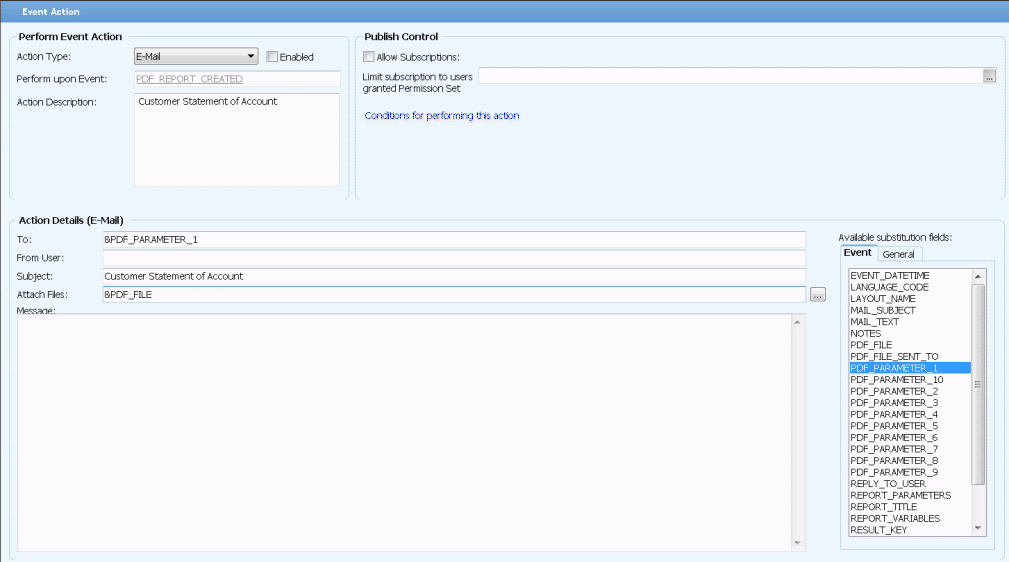
- In the Create New Action window, select E-mail from
the Action Type field.
- Select the Event ID as PDF_REPORT_CREATED from the Perform
upon Event field and, enter the title of the report in the Action
Description field.
- Drag and drop &PDF_PARAMETER_1 in to the To field from the list
on the right hand side or else enter it as shown in the screen shot below.
- Enter &PDF_FILE in the Attach Files field.
- In the Subject Filed, enter the subject of the email. For
example, the name of the report can be entered as subject.
- Click the link, Conditions for performing this action and enter the
Report ID as the value for PDF_PARAMETER_2
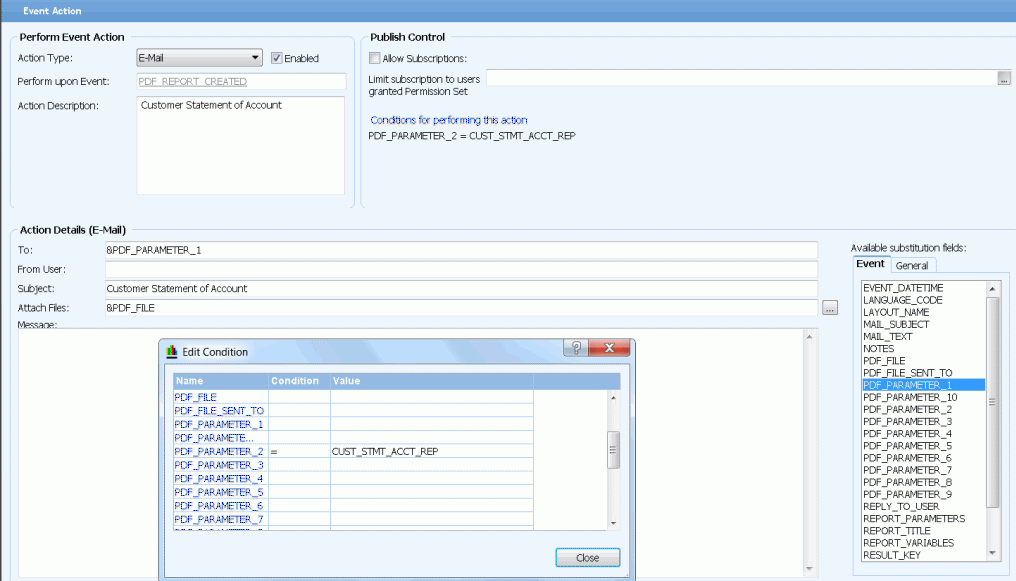
- Select the Enabled check box in the New Event Action window and save the
event.