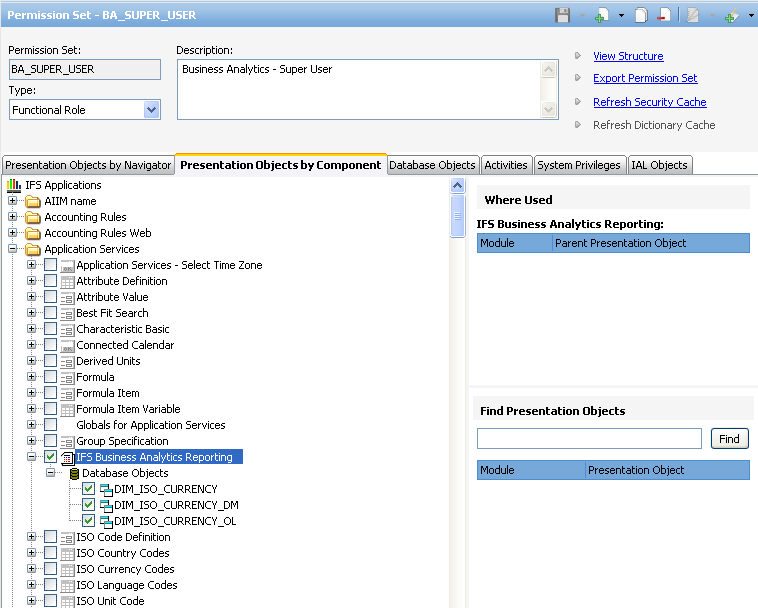
Figure 2:Grant access to presentation objectss
Use this page to learn how to grant access to an Information Source as well as to published IFS Business Analytics reports.
When an Information Source is created, all referenced dimension and fact views are added to a presentation object in the component that owns the entities. The Presentation Object is named IFS Business Analytics Reporting.
Figure 2:Grant access to presentation objectss
Note: Refer the Presentation Object by Component tab in the Create New Permission Set form in IFS Solution Manager.
In order to view Information Source details in design mode or to execute a report in end user mode, access must be granted to the Presentation Object IFS Business Analytics Reporting in appropriate components.
For each dimension and fact view that is created, security must be granted to end user roles, where one way is to grant the Presentation Object IFS Business Analytics Reporting.
During installation of BI Services specific metadata, it will be made sure that:
It is recommended that the role BA_SUPER_USER is not used for granting Information Sources to end users, since the users then will have access to all Information Sources.
However for a BI Services developer it is appropriate to granted the role BA_SUPER_USER, to make it easy to develop new Information Sources, deploy metadata etc, without having to set up security every time. The following is recommended setup for BI Services developers:
It is not recommended to grant permission to all available metadata objects to an end user permission set like e.g. BA_USER, since this would not only allow all users to execute IFS Business Intelligence Services reports but it would also allow the users to access all data sources.
Reports published to Info Services from IFS Business Analytics client, are available for the end user role BA_USER by default. (i.e. as long as the build role BA_REPORT_USER is granted to the BA_USER role, which is the default setting).