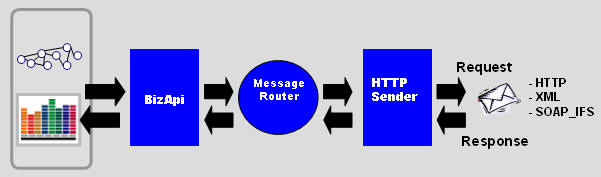
IFS Connect has the possibility to use an IFS specific SOAP format for transport of the IFS xml-records.
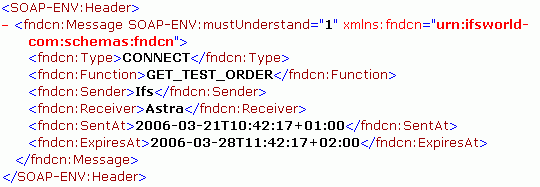
The SOAP_IFS body is used to encapsulate the IFS xml-record and the SOAP header
is
defined by IFS like the example below :
The element <fndcn:Function> is the element that is used for message identification.
Normally is this field equals to the BizApi name. For example RECEIVE_CUSTOMER_ORDER..
The element <fndcn:Receiver> identifies the receiver of the message.
The element <fndcn:Sender> identifies the sender of the message.
The element <fndcn:SentAt> is a timestamp when the message is sent.
The element <fndcn:ExpiresAt> is a timestamp that defines when the message
should be obsolete.
All this element above can be used by the
Message Routing
to route the inbound message to the correct destination(s).
IFS Connect is currently implementing the SOAP_IFS protocol for all included transport
connectors and every new transport connector that is created will automatically
use this envelopes.
An asyncronous message is sent to IFS Connect.
Note! The examples below shows the SOAP gateway(HTTP reader) but it could be
to any of the included readers in IFS Connect such as Mail, Ftp, File and MQseries.
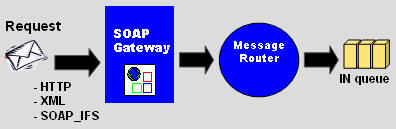
View example of an inbound asynchronous message.
If a matching routing rule is find in the Message Routing (with a queue specified)
will the message be
posted to the queue system. A response message is returned to the sender.
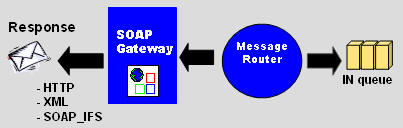
View example of a asynchronous response message
If for example not a matching routing rule is find will the message be posted
to the ERROR-queue.
(Other type of errors can also give the same behaviour)
Note! Only errors that is detected when try to route and post to the queue
system is handled here.
Error that occurs when the message is executed by the batch process will not be
visible here.
They will be visible in the queue system with state FAILED.
If user or password not is authorized:
Post error: 401 Unauthorized
If the URL is incorrect:
Post error: 404 Not Found
Application errors from SOAP gateway:
HTTP: 500 Internal Server error
and a SOAP error response message that follows the SOAP standard.
This message contains the detailed error description.
View example of an error message
An synchronous request is sent to IFS Connect.
Note! The examples below shows the Connect gateway (HTTP reader) but it could be
to any of the included readers in IFS Connect such as Mail, Ftp, File and MQseries.
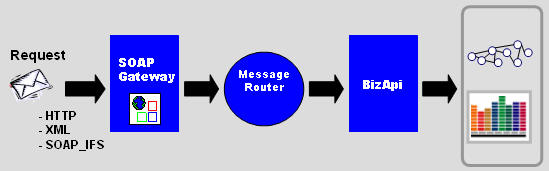
View example of an inbound synchronous
message.
If a matching routing rule is find in the Message Routing (without a queue specified)
will the actual
BizAPI be executed. A response message with the BizAPI result is returned to the
sender.
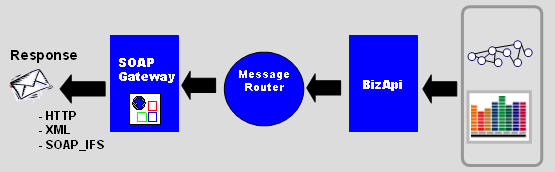
View example of a synchronous response message
If user or password not is authorized:
Post error: 401 Unauthorized
If the URL is incorrect:
Post error: 404 Not Found
Application errors from SOAP gateway:
HTTP: 500 Internal Server error
and a SOAP error response message that follows the SOAP standard.
This message contains the detailed error description.
View example of an error message
An asynchronous message is sent out from IFS Connect queue system
Note! The examples below shows the HTTP sender but it could be to any of the included
senders in IFS Connect.
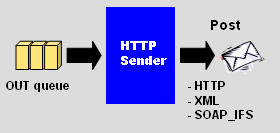
View example of an outbound asynchronous
message.
The receiving system should if everything is ok return a response message
Note! This is only applicable for the HTTP sender. Not for other Connect senders.
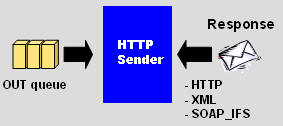
View example of a asynchronous response message
An error response message that follows the SOAP standard should be returned to
IFS Connect is some error in
the receiving system..
This message should contain detailed error description.
HTTP 500 Internal Server error with error description should also be returned.
Note! This is only applicable from the HTTP sender. Not for other Connect senders.
View example of an error message
This is equivalent to Inbound synchronous message flow. The directions is only
changed.
Request/Response